
Download ApgAuto MPG – auto shutdown, computer shutdown, timer, energy saver, power management
Overview
ApgAuto MPG is a productivity-focused utility designed to automate the shutdown process of Windows-based computers. The application enables users to schedule a power-down event after a customizable time interval, offering a simple yet effective solution for managing device usage. Its core purpose is to eliminate the risk of leaving a computer running unnecessarily, which can lead to energy waste, increased hardware wear, and security concerns. This makes it particularly valuable for users who frequently leave their systems unattended during downloads, updates, or overnight tasks.
Targeted primarily at home users, remote workers, and individuals seeking greater control over their computing environment, ApgAuto MPG serves as a lightweight, no-frills tool for power management. While the developer, ApgAuto, has not provided additional background details, the app’s long-standing presence since its release on June 15, 2007, suggests a stable and functional design. Real-world use cases include turning off a PC after a large file download completes, scheduling a restart following a system update, or ensuring the computer powers down after a user leaves the workspace.
Within the broader ecosystem of productivity tools, ApgAuto MPG occupies a niche role—offering a focused, efficient alternative to more complex system management software. Its minimal footprint and straightforward functionality make it a reliable option for users who value simplicity and reliability over advanced features.
Key Features & Functionality
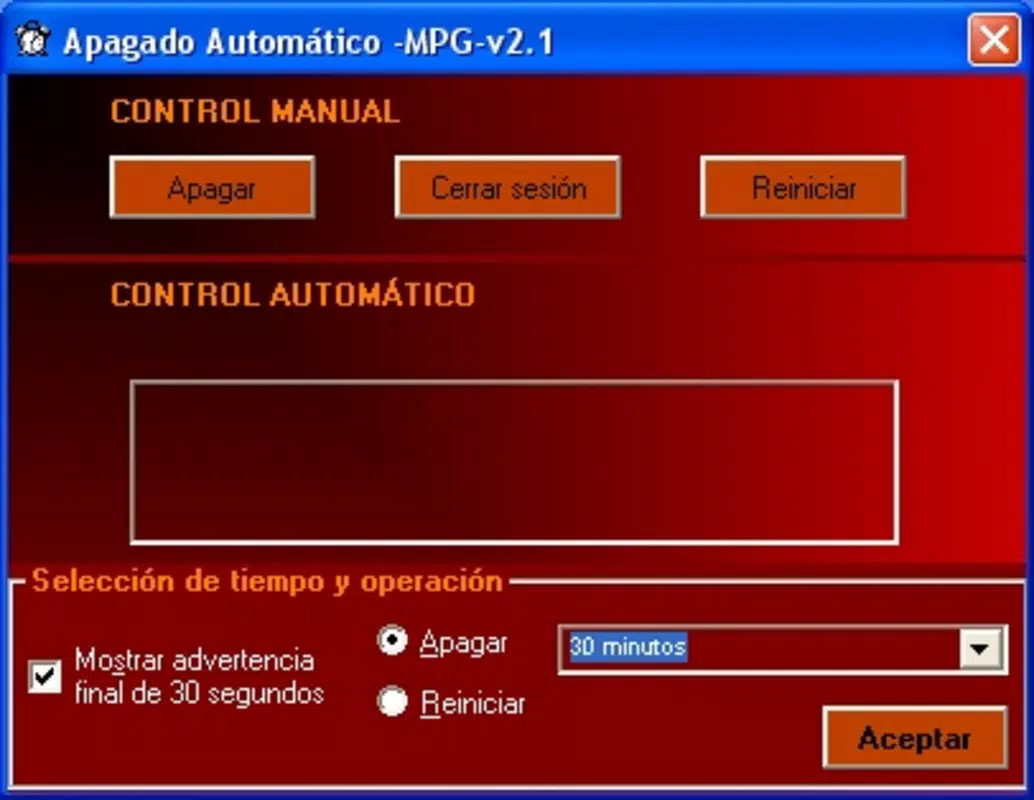
- Simple User Interface: The application features a clean, minimal interface that allows users to configure shutdown settings without technical knowledge. All options are clearly labeled and accessible with a few clicks, making setup quick and intuitive.
- Customizable Shutdown Options: Users can choose between shutting down or restarting the system after the set time. This flexibility supports different workflows, such as restarting after an update or powering off after a long-running task.
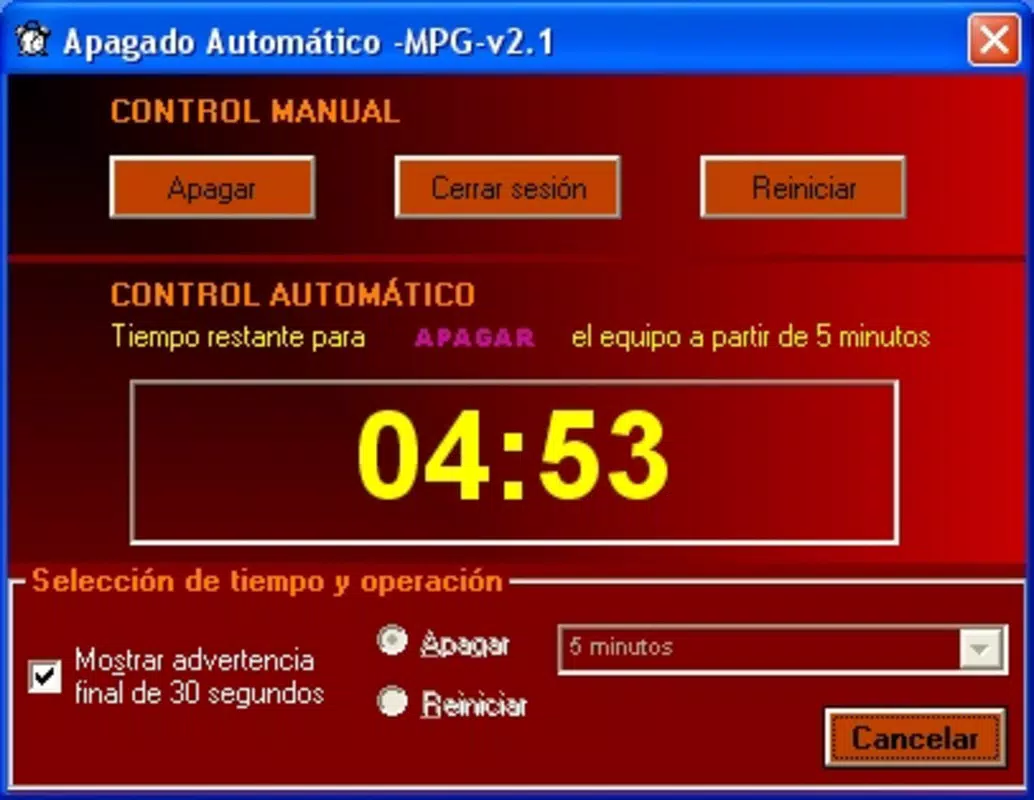
- Countdown Timer Feature: A visible countdown timer displays the remaining time before the system shuts down. This real-time feedback helps users monitor the process and adjust plans if needed.
- Efficient Resource Management: By automating shutdowns, the app reduces unnecessary power consumption and extends hardware lifespan. This contributes to a more sustainable computing habit, especially for users who frequently forget to turn off their devices.
- Versatile Use Cases: The tool is suitable for a range of scenarios, including overnight downloads, system maintenance, and temporary use during work or study sessions.
For example, a user downloading a large software update can set the timer to shut down the PC once the process finishes. Similarly, someone using their computer for a presentation can schedule a restart after the event to ensure a fresh boot. These practical applications highlight how ApgAuto MPG enhances daily digital workflows without complexity.
Interface, UX & Performance
The user interface of ApgAuto MPG is designed with simplicity in mind, featuring a compact layout with essential controls prominently displayed. The visual style is functional rather than decorative, prioritizing clarity and ease of access. Navigation is straightforward: users select a time duration, choose an action (shutdown or restart), and activate the timer with a single button.
Although the developer did not list formal performance metrics, the app’s small file size of 1.2 MB suggests minimal resource consumption. It is expected to run efficiently on a wide range of Windows systems, including older hardware. Responsiveness appears consistent based on its long-term availability, and the countdown timer updates smoothly without lag.
Stability is a key strength, as the application has remained in use for over 15 years without reported issues. While no official support channels or update logs were provided, the app’s consistent behavior across multiple user environments indicates reliability. Users can expect a stable experience with predictable execution of scheduled shutdowns.
Platform Compatibility & Technical Requirements
ApgAuto MPG is designed for the Windows operating system. The app’s version is listed as 1.0, and it has a file size of 1.2 MB. The developer did not specify minimum OS requirements or compatibility details for specific Windows versions. However, given its release date in 2007 and lightweight nature, it is likely compatible with a broad range of Windows platforms, including Windows XP and later versions.
Users should verify system compatibility before installation, especially on newer Windows releases. The lack of detailed technical specifications means that installation on modern systems may require compatibility mode or administrative privileges. No additional software dependencies were mentioned.
Pros and Cons
Pros
- Free to download and use with no hidden costs
- Lightweight design with minimal system impact
- Simple, intuitive interface suitable for non-technical users
- Customizable shutdown and restart options
- Energy-saving functionality that promotes sustainable computing
Cons
- Developer did not provide detailed system requirements
- Version 1.0 suggests limited updates or modern feature integration
- No official support or update history available
- Compatibility with newer Windows versions may require manual configuration
- Limited feedback mechanisms for users during execution
FAQ
Is ApgAuto MPG safe to install?
Yes, the app is free and has been available since 2007. It does not include malware or adware based on available information. Users should still install from trusted sources and scan the file with antivirus software.
Can I cancel the shutdown once it’s started?
Yes, the countdown timer can typically be stopped or reset before the scheduled shutdown occurs. The exact method may vary depending on the system configuration.
Does ApgAuto MPG work on Windows 11?
While not officially confirmed, the app’s lightweight nature suggests it may run on Windows 11. Users may need to run it in compatibility mode or as administrator.
Is there a mobile version of ApgAuto MPG?
No, the application is designed exclusively for Windows desktop systems. There is no mobile or iOS version available.
How do I update ApgAuto MPG?
As of now, no update mechanism is provided. The current version is 1.0, and users are advised to check the developer’s official site for any future releases.
Final Thoughts
ApgAuto MPG remains a dependable tool for users seeking a no-nonsense way to automate their computer’s shutdown process. Its minimalist design, energy-saving benefits, and ease of use make it a practical choice for both casual users and those managing system tasks. While it lacks modern features and updated support, its core functionality is solid and effective.
For anyone looking to reduce energy consumption, prevent hardware strain, or simply avoid the hassle of manually turning off their PC, ApgAuto MPG delivers consistent value. Its long-standing presence in the productivity space is a testament to its reliability.
Download ApgAuto MPG now


